OverviewRingkasan
One app, two rolesSatu app, dua peran
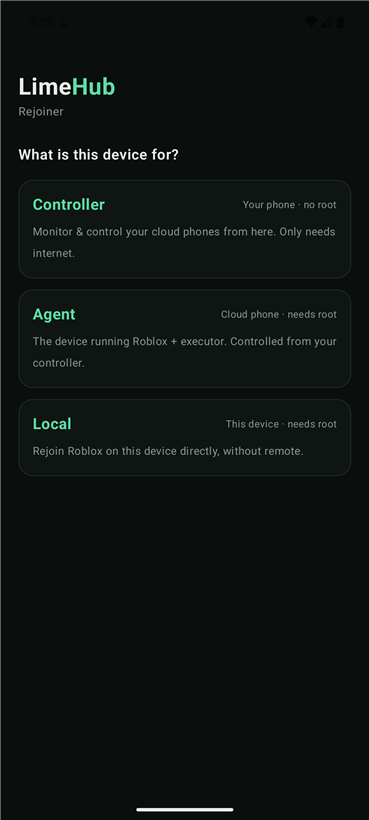
Install the same app everywhere and choose a role the first time you open it. You can switch roles anytime from the top of the screen. Install app yang sama di semua device, lalu pilih peran pas pertama buka. Peran bisa diganti kapan aja dari atas layar.
Controller
Monitors and controls every cloud phone over the internet. Just needs a connection. Pantau & kontrol semua cloud phone lewat internet. Cuma butuh koneksi.
Agent
Runs Roblox and your executor, and does the actual rejoining — driven by your controller. Jalanin Roblox + executor kamu dan ngelakuin rejoin-nya — dikontrol dari controller.
ArchitectureArsitektur
How it worksCara kerja
Both roles sign in with the same license key. The LimeHub relay pairs your controller with your cloud phones automatically — no IP addresses, no port forwarding, works through any cloud network. Dua peran login pakai license key yang sama. Relay LimeHub otomatis nyambungin controller dengan cloud phone kamu — tanpa setting IP, tanpa port forwarding, jalan di jaringan cloud apapun.
Your phoneHP kamu ⇄ LimeHub relay ⇄ Cloud phonesCloud phone
The key doubles as the pairing token — devices on the same key find each other.Key-nya sekaligus jadi token pairing — device dengan key yang sama saling nemu.
Before you startSebelum mulai
RequirementsKebutuhan
| RolePeran | Device | NeedsButuh |
|---|---|---|
| Controller | Your phone — Android 8+HP kamu — Android 8+ | Internet. No root.Internet. Tanpa root. |
| Agent | Cloud phone — Android 8+ | Root (su), Roblox, and your executor installed.Root (su), Roblox, + executor kamu keinstall. |
Most cloud phones run Android 10 and ship rooted, so they work out of the box. Kebanyakan cloud phone Android 10 + udah root, jadi langsung jalan.
Step 1Langkah 1
Install the appInstall app-nya
- Download the LimeHub Rejoiner APK from your seller.Download APK LimeHub Rejoiner dari penjual.
- Install it on your phone and on each cloud phone — it's the same APK.Install di HP kamu dan di tiap cloud phone — APK-nya sama.
- On the first launch, choose a role: Controller on your phone, Agent on each cloud phone.Pas pertama buka, pilih peran: Controller di HP kamu, Agent di tiap cloud phone.
Step 2Langkah 2
Set up the controllerSetup controller
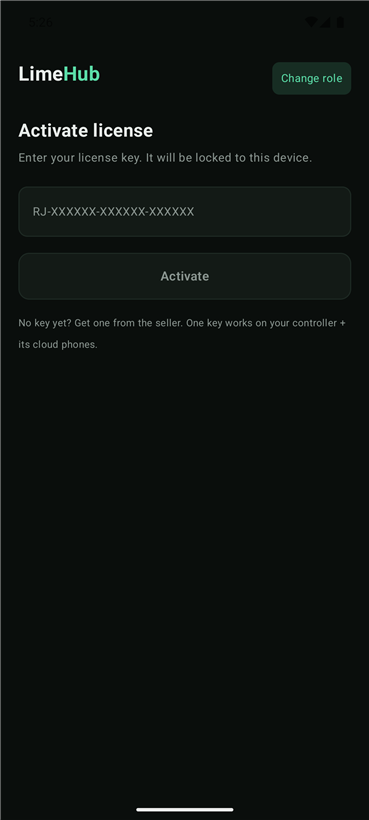
- Open the app on your phone → pick Controller.Buka app di HP kamu → pilih Controller.
- Enter your license key and tap Activate. The key locks to this phone.Masukin license key → tap Activate. Key terkunci ke HP ini.
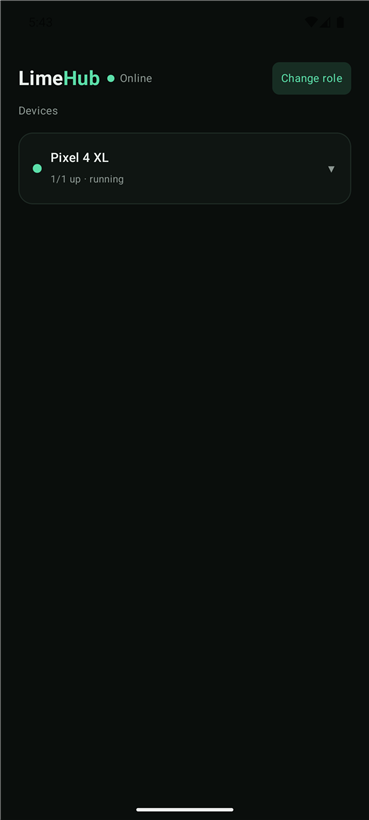
- You land on the Devices screen. Cloud phones show up here once their agents are running.Kamu masuk ke layar Devices. Cloud phone muncul di sini begitu agent-nya jalan.
Step 3Langkah 3
Set up a cloud phoneSetup cloud phone
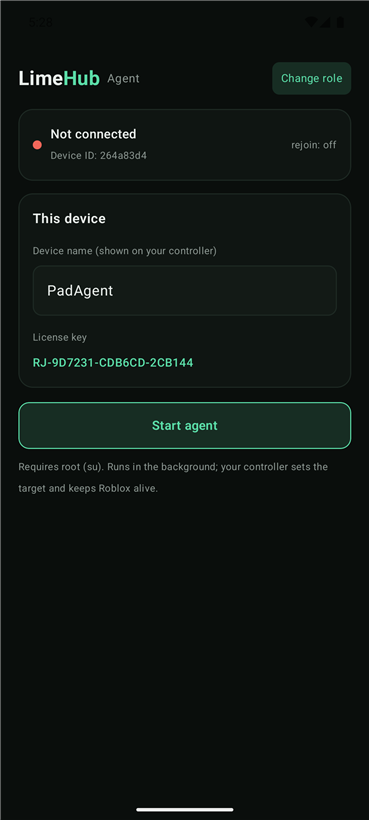
- On the cloud phone, open the app → pick Agent.Di cloud phone, buka app → pilih Agent.
- Enter the same license key → Activate.Masukin license key yang sama → Activate.
- Give it a name so you can tell it apart on your controller.Kasih nama biar gampang dibedain di controller.
- Tap Start agent and grant root (su) when prompted.Tap Start agent + kasih izin root (su) pas diminta.
Step 4Langkah 4
Run a gameJalankan game
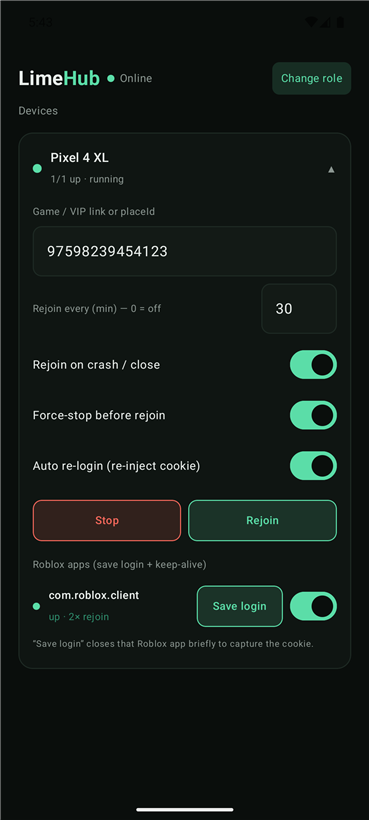
On your controller, tap a device to open its controls:Di controller, tap device buat buka kontrolnya:
- Paste a game link, VIP link, or placeId.Tempel link game, link VIP, atau placeId.
- Set Rejoin every (min), or
0to only rejoin on a crash.Set Rejoin every (menit), atau0buat rejoin pas crash aja. - Flip Rejoin on crash, Force-stop before rejoin, and Auto re-login to taste.Atur toggle Rejoin on crash, Force-stop before rejoin, dan Auto re-login sesuai mau.
- Tap Start. The cloud phone opens the game and keeps it alive.Tap Start. Cloud phone buka game-nya + jaga tetap nyala.
Auto re-login
Tap Save login on a Roblox app to capture its session. With Auto re-login on, the agent re-injects it on every rejoin, so a logged-out account comes back on its own. Tap Save login di app Roblox buat nyimpen sesinya. Kalau Auto re-login nyala, agent inject ulang tiap rejoin, jadi akun yang ke-logout balik sendiri.
Stay AFKTetap AFK
Executor key alertsNotif key executor
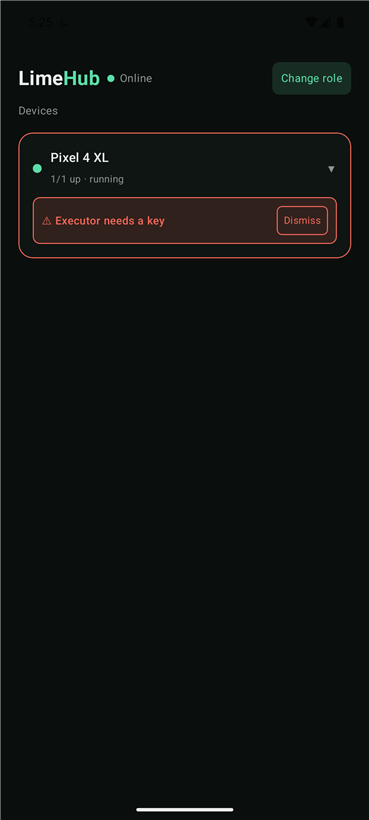
Executor keys usually expire about once a day. The moment a cloud phone's executor asks for a new key, that device turns red on your controller with “Executor needs a key” and you get a notification. Key executor biasanya expired sekitar sehari sekali. Begitu executor di cloud phone minta key baru, device itu jadi merah di controller dengan “Executor needs a key” dan kamu dapet notif.
Grab a key yourself, enter it on that cloud phone, then tap Dismiss. The app never bypasses the key system. Ambil key-nya sendiri, masukin di cloud phone itu, terus tap Dismiss. App ini gak pernah nge-bypass sistem key.
HelpBantuan
TroubleshootingMasalah & Solusi
Set a game link or placeId first — Start stays disabled until there's a target.Set link game / placeId dulu — Start mati sampai ada target.
Use the same license key, tap Start agent, and grant root (su) on that phone.Pakai license key yang sama, tap Start agent, + kasih izin root (su) di HP itu.
Make sure Roblox is installed and the agent has root. The agent auto-detects the device's su type.Pastiin Roblox keinstall + agent punya root. Agent auto-detect tipe su device-nya.
The key is locked to a controller. Ask your seller to reset or transfer it.Key terkunci ke satu controller. Minta penjual buat reset / pindahin.
Make sure the executor's key prompt is actually showing on that cloud phone. If it still doesn't trigger, contact your seller.Pastiin layar minta key executor beneran muncul di cloud phone itu. Kalau tetep gak kepicu, hubungi penjual.